
VBOX Test Suite has many pre-defined tests (test plugins). You can add these tests by either selecting the Add button on the home tab or selecting the desired test from the test categories on the home tab.
NOTE
The Test section on the Home tab will display the tests you have marked as Favourites in the Add Test window.
- Click on the Add button to open the Add Test window and browse the available tests.
The Add Test window is split into various sections: Categories, Tests, Saved Settings, Description and Version.
The Categories area contains groups of test types.
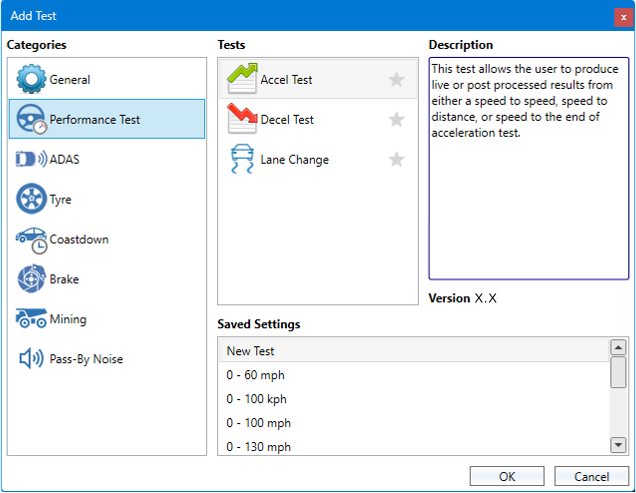
- Click on a category to display the available tests in the Tests area.
- Click on a test in the list.
You will see a short description of the test in the Description area and the test's version number in the Version area.
You can also see a list of previously saved test configurations in the Saved Settings area.
- Select the default version of the test or a previously saved configuration to load.
- Click OK to open the selected test.
A new test tab will be displayed in a new tab in the workspace area.
The following plugin categories are available. Select a category at the bottom of the page for more information about how to use the different plugins in it.

- Workspace
Add a new workspace where you can analyse an online or loaded data file without the need to produce test results. - CustomTest
Complete a wide range of tests to a set of conditions.

- Accel Test
Produce live or post-processed results from either of the following tests:- speed-to-speed
- speed-to-distance
- speed to the end of the test
- Decel Test
Produce live or post-processed results from either of the following tests:- speed-to-speed
- speed-to-distance
- Lane Change
Complete and analyse different lane Change tests, such as the ISO 3888-2.

- Dooring Test (beta)
Complete and analyse a dooring scenario according to the 2023 Euro NCAP Vulnerable Road User test protocol. - DSM: Short Distraction (VATS) (beta)
Perform Driver Status Monitoring tests. - DSM: Long Distraction (beta)
Perform Driver Status Monitoring tests. - Euro NCAP CCRs
Test to the Euro NCAP CCRs AEB protocols. - Euro NCAP CCRm
Test to the Euro NCAP CCRm AEB protocols - Euro NCAP CCRb
Test to the Euro NCAP CCRb AEB protocols.
- Park Assist
Validate Park Assist systems to ISO regulation 204/WG14 ISO 16787. - UNR79 Max Lateral Accel
Complete and analyse a Maximum Lateral Acceleration test as described in the UNR79 document. - UNR79 Lane Keeping
Complete and analyse a Lane Keeping Function test as described in the UNR79 document. - UNR79 CSF
Complete and analyse a Commanded Steering Function test as described in the UNR79 document.

- Tyre Traction
Compare the traction forces and wheel slip of different tyres. - Lateral Aquaplane
Measure the lateral aquaplane performance of a given tyre based on speed and attained lateral acceleration. - Longitudinal Aquaplane
Measure when aquaplaning starts to occur and the percentage of wheel slip during aquaplaning.

- WLTP GTR15
Complete and analyse a coastdown test to the latest WLTP Coastdown protocol. - SAE J2263
Complete a coastdown test to the SAE J2263 specification. - ABNT NBR 10312
Complete and analyse a coastdown test to the latest ABNT 10312 Coastdown protocol.
- Brake Trigger
Analyse brake stops from either a brake trigger or from a user-defined CAN channel. - Brake Speed
Analyse brake stops from a user-defined start speed. - R78 Motorcycle Brake Force
Analyse motorcycle brake stops from either a brake trigger or from a user-defined CAN channel, such as brake pressure or brake position. - R139 Brake Assist, Category B (beta)
Carry out a brake assist test in accordance with the R139 regulation. - SAE J2909 Brake Force
Complete brake stops that conform to the SAE J2909 specification.

- Corner Analysis
Generate reports to summarise operator driving behaviour for each corner. - Time and Motion
Generate reports to see how queuing time would change as a result of simulated speed limits and if there would be any occurrences of the excavator waiting. - TKPH
Generate reports to summarise performance across different circuits and check if the vehicle TKPH is exceeding the tyre TKPH.

- EPA (beta)
Carry out a pass-by noise test in accordance with the EPA regulation. - R117 Pass-By Noise
Carry out a pass-by noise test in accordance with the R117 regulation. - R138 Pass-By Noise
Carry out a pass-by noise test in accordance with the R138 regulation. - R41 Pass-By Noise
Carry out a pass-by noise test in accordance with the R41 regulation. - R51 Pass-By Noise
Carry out a pass-by noise test in accordance with the R51 regulation.